
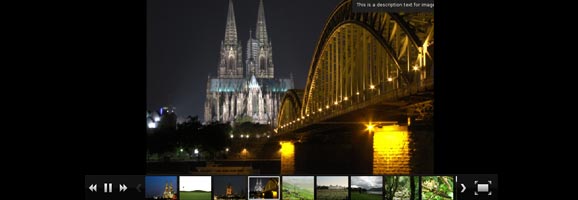
Alex Rabe developed wonderful photo plugin for WordPress that is NExtGEN Gallery plugin. I recommend this plugin as the best for making photo gallery.
1 ) If you have problem in Thumbnail Generation and Receive error like:
Follow thumbnails could not created.
DSC00422.JPG (Error : Exceed Memory limit. Require : 57 MByte)
DSC00423.JPG (Error : Exceed Memory limit. Require : 57.01 MByte)
DSC00424.JPG (Error : Exceed Memory limit. Require : 57.01 MByte)
DSC00425.JPG (Error : Exceed Memory limit. Require : 57.01 MByte)
For Older Version:
You just edit the file “thumbnail.inc.php” which is located at: /wp-content/plugins/nextgen-gallery/lib/thumbnail.inc.php
Search for
// @ini_set(‘memory_limit’, ‘128M’);
Change it to
ini_set(‘memory_limit’, ‘128M’);
Now you are done, just save and upload the file.
For New Version:
You will not find the file “thumbnail.inc.php” instead you will find the file “gd.thumbnail.inc.php” which is located in the same location “/wp-content/plugins/nextgen-gallery/lib/thumbnail.inc.php” . You just need to edit this file.
Search for
// @ini_set(‘memory_limit’, ‘128M’);
Change it to
@ini_set(‘memory_limit’, ‘128M’);
Now you are done, just save and upload the file.
Link to NextGEN Gallery Plugin: http://wordpress.org/extend/plugins/nextgen-gallery/
2) If you have problem finding and locating imagerotator.swf for shildeshow in Gallery. Then you can Click Here to download.
After downloading it just unzip it and then upload it in the “wp-content/uploads” and then in the Slideshow option give the path of it as “wp-content/uploads/imagerotator.swf”. Just save it and you are done.
Edited on: Nov 30, 2009
Published on: Jan 18, 2009
Enjoy.
sakin
Great it works! txs a lot
thanks, awesome… solved my issue
That did the trick, Thanks so much!!!
ks
PERFECT! Thank you
In New version of NextGEN Gallery you need to edit the file “gd.thumbnail.inc.php” which is located at: /wp-content/plugins/nextgen-gallery/lib/gd.thumbnail.inc.php
Search for
// @ini_set(‘memory_limit’, ‘128M’);
Change it to
@ini_set(‘memory_limit’, ‘128M’);
Can you help me? I’m having trouble finding a solution. I want to change the image thumbnail background color from #555555 to #f5f5f5. I’ve pour over every css available for this plug in, but have not been successful.
I want the frame around the thumbnails to look like this:
http://nextgen-gallery.com/gallery-tags/
Here’s my site:
http://nextgen-gallery.com/gallery-tags/
Thank you,
Marlee O’Neal
oops sorry — here’s my site:
http://onealart.com
Hi Marlee,
I just checked your site and found that you have define the background color in two files. One is in the ngggallery.css which is the file of NGG gallery and another one is style.css which is you theme file.
You can use any one the following solutions:
1) Change in your sytle.css line no 90 you will wee the following code:
.post img, .post a img {
background:#555555 none repeat scroll 0 0;
border:1px solid #222222;
margin:0;
padding:5px;
}
Change this to the following:
.post img, .post a img {
background:#F5F5F5 none repeat scroll 0 0;
border:1px solid #222222;
margin:0;
padding:5px;
}
2) Change in NGG Gallery Style that is nggallery.css in line no 143 you will see the following code:
.ngg-gallery-thumbnail img {
background-color:#FFFFFF;
border:1px solid #A9A9A9;
display:block;
margin:4px;
padding:4px;
position:relative;
}
Change this to the following:
.ngg-gallery-thumbnail img {
background-color:#F5F5F5 !important;
border:1px solid #A9A9A9;
display:block;
margin:4px;
padding:4px;
position:relative;
}
Regards,
Sakin
That worked! Awesome, thanks so much!! 🙂
Hello there,
I have used your wonderful plugin to display a slideshow in the header of the website and also in the content in few places. However, there is lots of padding around each image displayed in the slideshow. I have tried everything, reupload, changing sizes, stylesheets, even uploading images that are bigger than the slideshow, but nothing works. Could you help please?
The website is at victorian-extravaganza dot co dot uk
Thanks a lot!
Maya
I’m getting this error but with the image.php, not the thumbnail. Is there a fix for that one?
plugins/nextgen-gallery/lib/image.php
Thanks for your post, awesome.
problem solved. Plugin ‘Bind user to category’ was the problem.
hi there,
Problem not solved. I’ve been looking for hours and can’t seem to find a solution. I love using nextgen, but suddenly it doesn’t seem to be working anymore.
Tried it on several different sites, but no luck. No thumbs yet. 🙁
Thanks you very much for this great tip.
This is really the BeSt Gallery plugin.
Hi,
I’ve updated the next gen plugin on my wordpress site, and now the thumbnails are long and distorted. Can you advise me on a fix to this problem? I’ve tried many suggested fixes and none have worked.
Thanks
i would like to change the location at which the thumbnails populate. it looks too low in my site. how do i change this? which file do i need to modify in the plugin editor?
I change what did you say above but still problem in creating thumnails. This problem in my server not in my localhost.
it’s works for me! Thanks
Thanks very much, I’ve been very frustrated trying to get full size images to upload properly. I’m surprised that the memory limit line is commented out by default.
Hello,
for me it was working with comment this lines:
// if($this->error == false) {
// Check memory consumption if file exists
// $this->checkMemoryForImage($this->fileName);
// }
Regards
Raduz